Concert Ticket Price Drop Alerts That Actually Work


The fastest way to catch a price drop: use a dedicated ticket-tracking service, set a target price that includes estimated fees, enable push notifications, and apply a 36-hour cutoff before showtime. That combination covers the window where most savings actually appear.
The short list of tools worth your time:
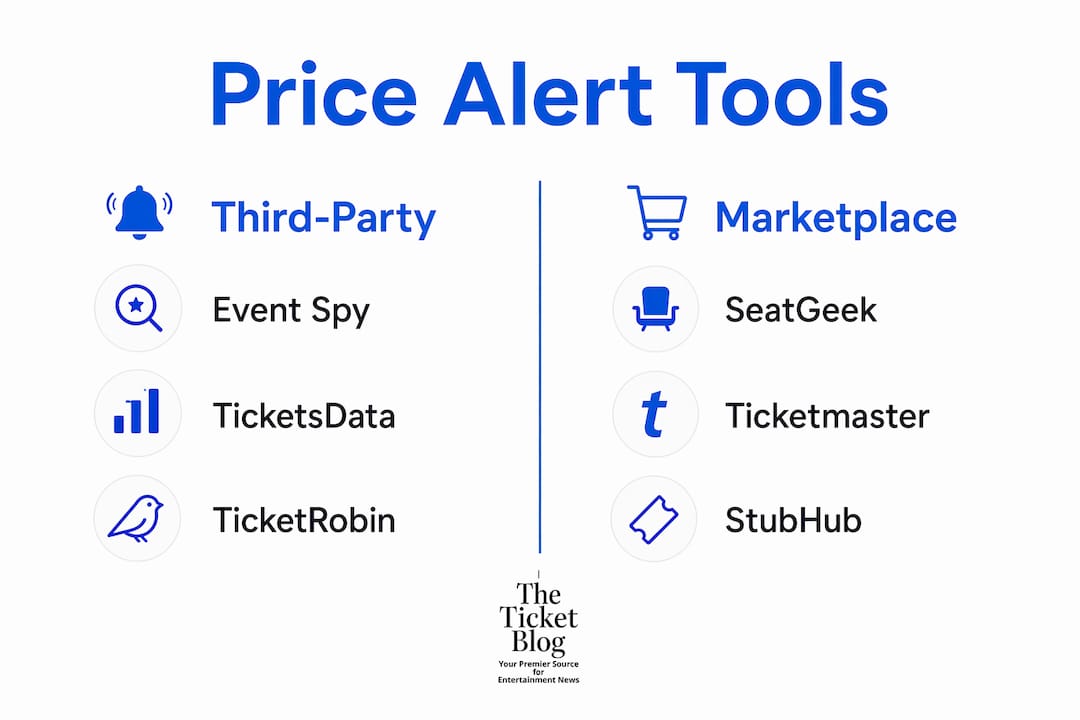
Event Spy — consumer-friendly, multi-marketplace tracking with instant notifications; best starting point for most fans
TicketsData — developer-grade monitoring with webhook and Discord integration; best for power users who want automation
TicketRobin — focused alerting with section/row/quantity filters; solid for fans who know exactly where they want to sit
SeatGeek Price Alerts — built-in app alerts (push + email) tied directly to SeatGeek listings; zero setup friction
Ticketmaster alerts — official notifications for primary inventory and Verified Resale; limited but trustworthy
StubHub app notifications — in-app alerts for StubHub resale listings; useful as a secondary layer
One-line setup:
Pick one tool from the list above.
Add your event and set a target total price (face value + estimated 15% in fees).
Enable push notifications and, if available, SMS as a backup.
Set a hard cutoff: if the price hasn’t hit your target by T-36 hours, decide then whether to buy at the current floor or walk away.
Table of Contents
Which concert ticket price drop alert tools should you use?
The six tools below cover the full range from casual fan to developer. Note that SeatGeek, Ticketmaster, and StubHub each appear as both a native alert feature and a marketplace tracked by third-party services.
Tool | Best for | Pricing | Polling frequency | Marketplaces tracked | Notification channels | Key filters | Limits |
Most fans; quick setup | Free tier available | Near-real-time | Multiple resale markets | Email, push | Price target | Per plan | |
Developers, power users | Tiered; free limits apply | Every few seconds to 60 min | Multi-platform | Email, Discord, webhook | Section, qty, price | Rate limits by plan | |
TicketRobin | Seat-specific buyers | Free Basic; Fast and Instant tiers | 30 min (free) / 5 min / instant | Official + authorized resale | Email, WhatsApp (higher tiers) | Section, row, qty, delivery | Events tracked per plan |
SeatGeek Price Alerts | SeatGeek shoppers | Free (built-in) | App-dependent | SeatGeek only | Push, email | Price threshold | SeatGeek listings only |
Ticketmaster alerts | Primary inventory buyers | Free | Event-driven | Ticketmaster primary + Verified Resale | Email, push | Event/artist | No price-drop matching |
StubHub app notifications | StubHub resale buyers | Free (built-in) | App-dependent | StubHub only | Push, in-app | Listing-level | StubHub listings only |
A few practical notes on each:
Event Spy scrapes multiple resale marketplaces and fires notifications the moment a listing hits your target price. The interface is clean enough that most fans can set up their first alert in under two minutes, which is why it’s the default recommendation for casual concertgoers.
TicketsData is a different category entirely. It delivers structured JSON payloads to webhooks or Discord channels, complete with event ID, alert type, and timestamps. If you want to route alerts into a Slack channel or trigger an automated workflow, this is the tool. Casual fans won’t need it.
TicketRobin’s tiered model is worth understanding before you sign up. The free Basic plan checks every 30 minutes, the Fast plan drops to 5 minutes, and the Instant plan runs continuous monitoring. For high-demand shows where tickets vanish in seconds, the free tier is too slow to be useful.
SeatGeek’s built-in price alerts are the easiest entry point if you already use the app. The trade-off is obvious: you only see SeatGeek inventory. Pairing it with a third-party tracker like Event Spy covers the gap.

Ticketmaster’s alert system is primarily event-notification focused rather than price-drop focused. It notifies you when new events go on sale and surfaces Verified Resale listings, but Ticketmaster does not offer price-matching or post-purchase refunds if prices fall after you buy. Use it for primary inventory awareness, not resale price hunting.
StubHub’s app notifications work well within the StubHub ecosystem. Like SeatGeek alerts, they’re free and require no extra setup, but they’re blind to listings on other platforms.
Pro Tip: Run Event Spy or TicketsData alongside your native app alerts (SeatGeek or StubHub). The third-party tool catches cross-platform drops; the native app catches platform-specific deals. Together, they cover most of the resale market.
How do concert ticket price-drop alerts actually work?
Every alert service follows the same basic pipeline: poll a marketplace, compare current prices against your match rules, and push a notification when there’s a hit.
The polling step is where services diverge most. TicketsData can poll as frequently as every few seconds on higher-tier plans, while a free-tier service might check only once every 30–60 minutes. That gap matters on high-demand shows where a good listing can disappear in under a minute.
The monitoring pipeline in plain terms: A service sends a request to a marketplace’s public listings at a set interval, parses the response for listings that match your filters (price ceiling, section, quantity), and fires a notification through your chosen channel — push, email, SMS, or a webhook payload — the moment a match appears. The faster the polling interval, the closer to real-time your alert arrives.
Most third-party trackers monitor resale platforms like StubHub, SeatGeek, VividSeats, and TickPick. Primary inventory (Ticketmaster face-value tickets) is harder to track for price drops because primary prices rarely fall; what changes is availability, not price. Verified Resale on Ticketmaster is a partial exception, since those listings are set by individual sellers and can drop.
A brief note on privacy: services that require account linking or OAuth access to your marketplace accounts share more data than tools that only scrape public listings. Read the privacy policy before connecting any account credentials.
How to set effective concert ticket price-drop alerts
Follow these steps in order. Skipping the fee math in step 3 is the most common reason fans buy at a price that still feels expensive at checkout.
Pick your event and open your chosen tool. Start with one event to calibrate your settings before tracking five shows at once.
Find the current resale floor. Check SeatGeek, StubHub, and VividSeats for the lowest listed price in your preferred section.
Set your target total, not just the ticket price. Add roughly 15% for service fees and delivery. If the cheapest listing shows $80, your all-in cost is closer to $92. Set your alert target at or below that all-in number. For a more aggressive target, try: resale floor × 0.8 at T-36 hours.
Apply section, row, and quantity filters. Broad alerts generate noise. If you need two adjacent seats in the lower bowl, filter for exactly that. TicketRobin and TicketsData both support granular seat filters.
Enable push notifications first, then add SMS or email as a backup. Push is fastest; SMS catches you when your phone is locked; email is the slowest but useful as a paper trail.
Set a hard cutoff time. If your target price hasn’t appeared by 36 hours before showtime, decide at that moment whether the current floor is acceptable. EntryChecklist recommends a final safety margin of 4–6 hours before doors to avoid panic-buying and to confirm delivery method.
Example alert (copy this): Taylor Swift arena show, lower bowl, 2 adjacent seats. Current floor: $210 each. Target: $185 all-in per ticket (accounts for fees). Filter: sections 100–120, qty = 2. Cutoff: T-36 hours. Channels: push + SMS.
Pro Tip: To avoid duplicate alerts across multiple tools, stagger your target prices slightly. Set Event Spy at $185 and your native app alert at $190. The first hit tells you the market is moving; the second confirms it’s time to act.
What do price-drop alert services actually cost?
Free tiers exist across most tools, but they come with real constraints. Slower polling (30–60 minutes), fewer tracked events, and limited notification channels are the standard trade-offs. For casual fans tracking one or two shows a year, the free tier is usually enough.
Premium tiers typically unlock faster polling (down to a few seconds), more simultaneous events, advanced filters, and additional notification channels like WhatsApp or webhooks. TicketRobin’s three-tier structure (Basic / Fast / Instant) is a clear example of how services price the speed premium.
The core trade-off: Faster polling costs more and increases the chance of catching a drop before it disappears. But faster polling also generates more notifications, which can create alert fatigue if your filters aren’t tight. Set narrow filters before upgrading to a faster plan.
Developer-grade tools like TicketsData charge for structured payload access and high-frequency polling. That pricing reflects the infrastructure cost of near-real-time scraping across multiple platforms. For most fans, a mid-tier consumer plan is the better fit.
One operational risk worth knowing: some marketplaces actively block or rate-limit scrapers. A service that gets blocked temporarily will miss listings during that window. No alert service can guarantee 100% coverage, which is another reason to run two tools in parallel for high-priority shows. Always check total after fees and confirm the delivery method (mobile transfer is safest) before completing any purchase.
When does waiting for a price drop actually pay off?
The Stage Tracker analyzed 412 North American non-sold-out shows and found a consistent price floor at roughly 36 hours before showtime. The 36-hour rule holds for roughly 70% of non-sold-out shows. The price curve shows two clear downward steps: a meaningful drop between T-72 and T-36, a floor at T-36, then a rebound as walk-up demand returns in the final hours.
The 36-hour rule: For roughly 70% of non-sold-out concerts, the lowest resale prices appear in the window between 72 and 36 hours before showtime. Set your alerts to fire in that window and buy at the T-36 floor if your target is met.
That rule breaks down in predictable ways. Sold-out shows almost never drop; scarcity keeps prices elevated or rising. Stadium tours with dynamic pricing tend to show meaningful drops earlier, around T-5 days, as the algorithm adjusts to unsold inventory. Festival single-day tickets and hometown shows follow different patterns entirely, often dipping at T-14 or plateauing without a clear floor.
Pro Tip: For stadium tours, set your alert window to T-7 through T-5 days, not T-36 hours. Dynamic pricing algorithms often reset earlier than the standard resale curve, and waiting until T-36 can mean missing the actual floor.
The practical rule of thumb: set alerts now, monitor from T-72 to T-36, and buy at the floor if it hits your target. If it doesn’t, decide at T-36 whether the current price is worth it. Waiting past T-36 on a non-sold-out show usually costs you savings, not gains.
Key Takeaways
The most reliable way to save on concert tickets is to combine a third-party price tracker with a hard 36-hour cutoff and a target price that already accounts for fees.
Point | Details |
Use a third-party tracker | Event Spy or TicketsData covers multiple resale markets; native app alerts (SeatGeek, StubHub) cover only their own inventory. |
Set a total-price target | Add ~15% for fees to the listed price; alert on the all-in number, not the face price. |
Apply the 36-hour rule | 70% of non-sold-out shows hit their price floor around T-36 hours; buy then or set a firm cutoff. |
Know the exceptions | Sold-out shows, stadium dynamic pricing, and festival passes break the standard curve; adjust alert windows accordingly. |
The Ticket Blog | The Ticket Blog’s guides on timing windows and fee avoidance pair directly with any alert tool to sharpen your target-price math. |
The Ticket Blog’s take on price-drop alerts
Most fans set up an alert, wait for a notification, and then panic-buy the first listing that appears. That’s the wrong move, and it’s exactly what a hard cutoff is designed to prevent. The alert tells you the market is moving; the cutoff forces you to decide on your terms, not the market’s.
The conventional advice is to pick the tool with the most features. The better advice is to pick the tool you’ll actually check. A push notification from Event Spy that you act on beats a webhook payload you never configured. Start simple: one consumer-grade tracker, push notifications enabled, a target price that includes fees, and a 36-hour rule written down somewhere you’ll see it.
The Ticket Blog’s editorial stance is that most concertgoers need two things: a reliable alert and a plan for what to do when it fires. The guides on finding cheap last-minute tickets and avoiding ticket fees cover the second half of that equation in detail. Set the alert, read the guide, and you’ll buy with confidence instead of guessing.
Where to go next for deeper research
The Stage Tracker: The 7-Day Ticket Price Curve — the primary source for the 36-hour rule and price-curve data
TicketsData monitoring documentation — full detail on polling frequencies, webhook payloads, and filter options
EntryChecklist: last-minute ticket buying guide — cutoff rules, fee checks, and delivery method guidance
Event Spy — consumer-facing tracker; start here for a quick setup
SeatGeek price alert guide — how to use built-in SeatGeek alerts
The Ticket Blog: Best Time to Buy Concert Tickets — deeper timing analysis and seasonal patterns
The Ticket Blog: Summer Concert Ticket Buying Checklist — prioritized steps for summer tour season
Always verify current venue and promoter policies before buying, since delivery methods and transfer rules can change close to showtime.
The Ticket Blog covers what alert tools don’t
Alert tools tell you when prices move. They don’t tell you whether the deal is actually good, which fees to expect, or when the timing is right for your specific show type.
The Ticket Blog fills that gap with guides built specifically for concertgoers navigating the resale market. The fee avoidance guide shows you how to calculate a realistic target price before you set any alert. The discount types guide explains why resale prices differ from face value and which discount categories are worth chasing. Together, they give you the context that turns a price-drop notification into a confident purchase rather than a rushed guess. Browse the full library at The Ticket Blog and start with the guide that matches your next show.
Recommended


Comments