How Promo Codes Are Applied for Live Event Tickets


Promo codes are entered in a dedicated field at checkout, and the platform instantly validates the code against several conditions before deducting the discount from your order total. Understanding that sequence is what separates a smooth redemption from a frustrating “invalid code” error.
Here is what happens the moment you hit “Apply”:
Expiration check: The system confirms the code is still active and within its valid date range.
Minimum spend: Your cart total must meet any required threshold before the discount triggers.
Item eligibility: The code applies only to qualifying ticket types, usually primary-market purchases.
Active status: The offer must be live on the platform’s end, not paused or exhausted.
Usage limits: Single-use codes and per-account caps are checked against your account history.
One distinction worth knowing upfront: promo codes are entered at checkout and reduce your order total, while passcodes are entered before you select tickets to unlock restricted or presale inventory. They serve different purposes and appear at different stages of the purchase flow.
Table of Contents
How are promo codes validated and applied at checkout?
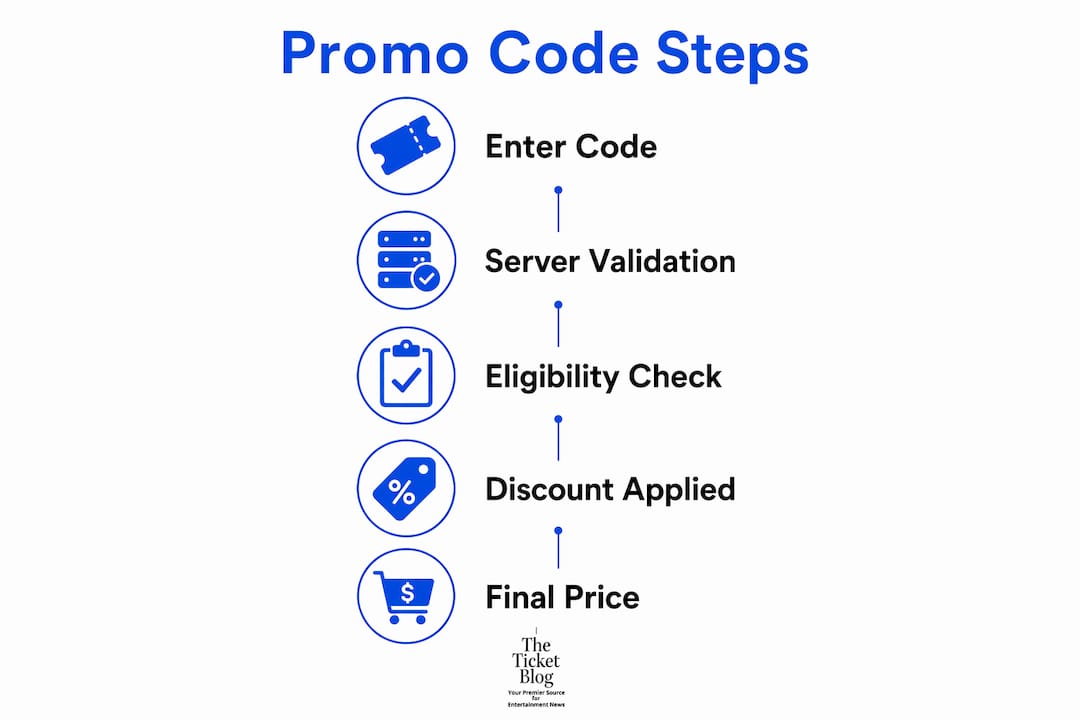
The system validates conditions instantly upon submission and applies the discount to your order total only after every check passes. No single step is skipped.
Enter the code in the promo field and press “Apply.”
Expiration validation: The server checks whether the code’s end date has passed.
Eligibility and item exclusions: The platform confirms your cart contains qualifying items. Resale tickets are almost always excluded.
Minimum spend check: If your subtotal falls below the required threshold, the code is rejected even if everything else is valid.
Usage limit check: The system verifies the code has not exceeded its total redemption cap or your personal use limit.
Discount applied: Once all conditions pass, the discount line appears in your order summary and your new subtotal updates immediately.
Most of this happens server-side, meaning the platform’s backend does the heavy lifting. The updated price you see in the UI reflects the confirmed result, not a preview.
Pro Tip: Always copy and paste your code directly from the source. Manual typing introduces case-sensitivity errors and visual mix-ups like “0” versus “O” or “1” versus “I” that are nearly impossible to catch by eye.
How do promo codes differ from passcodes in live-event ticketing?
Promo codes subtract dollars or a percentage from your checkout total. Passcodes do something different: they unlock seat inventory before you ever reach the cart, granting access to presale or restricted tickets that are not visible to the general public.

Feature | Promo Code | Passcode |
When you enter it | At checkout | Before ticket selection |
Effect | Reduces order total | Unlocks hidden inventory |
Applies to resale tickets | No | No |
Typical exclusions | Resale, VIP packages | General admission tickets |
Source | Newsletters, deal sites | Artist fan clubs, venue presales |
A practical example: if you are buying floor seats for a sold-out arena show through a primary-market platform, a passcode gets you into the presale queue. Once you have selected your seats and reached checkout, a promo code (if available) can then reduce what you owe. The two codes work in sequence, not interchangeably.
Where do you enter a promo code, and what makes it easy or hard?
The promo-code field is usually on the cart page or the final checkout page, but its visibility varies widely by platform. Some sites display an open text box immediately; others hide it behind a “Have a code?” link or a small “+” icon that expands the field only when clicked.
Nielsen Norman Group’s research recommends that platforms let users apply discounts with a single click, either through auto-apply from a banner or by exposing the code field directly in the cart. When the field is buried, buyers abandon checkout rather than hunt for it.
A second pattern worth knowing: no-code offers apply automatically when you click a special deal link or banner. No field, no typing. If a deal page shows no code but a “Get Deal” button, clicking it often routes you to the retailer with the discount already attached to your session.
Pro Tip: If you cannot find the promo field at the payment step, go back one screen. Many platforms, including some major ticketing sites, require code entry at the cart stage or before you enter payment details, not after.
Why is your promo code being rejected, and how do you fix it?
Most rejections are validation mismatches, not broken codes. Work through this checklist before contacting support.
Check the expiration date. Even a one-day-old code is dead on most platforms.
Verify the minimum spend. Remove any ineligible items and confirm your subtotal meets the threshold.
Confirm item eligibility. Resale tickets are excluded from nearly all promo codes on primary-market platforms.
Check account eligibility. “New customer” codes fail on existing accounts. Some codes are tied to a specific email address.
Look for usage limits. Single-use codes expire after one redemption, even if you never completed the purchase.
Remove conflicting codes. Most ticketing platforms allow only one promo code per transaction.
Try a private/incognito window. Cached sessions occasionally cause validation errors that a fresh browser session clears.
Verify you are buying primary-market tickets. Resale listings on the same platform will not accept standard promo codes.
Pro Tip: If the promo box is missing entirely at the payment screen, step back in the checkout flow. The field may only appear at the cart stage or after you have added a shipping address, depending on the platform.
How does a promo code change your final ticket price?
A promo code reduces your order subtotal according to its specific rules, but its effect on service fees and taxes depends on the platform and the code type. Shoppers who use promo codes frequently tend to save between 10% and 30% on online purchases, though the exact impact on a ticket order depends on what the code targets.
Common outcomes by code type:
Percentage-off codes (e.g., 15% off): Applied to the ticket face value; service fees may or may not be included, depending on platform terms.
Fixed-dollar-off codes (e.g., $10 off): Deducted from the subtotal; taxes are then calculated on the reduced amount on most platforms.
Fee-credit codes: Specifically offset service charges rather than ticket price, leaving the face value unchanged.
Free-shipping codes: Relevant for physical ticket delivery; no effect on ticket price or standard service fees.
Warning: Promo codes almost never apply to resale tickets. If your cart contains secondary-market listings, the code will either reject outright or apply only to any primary-market items in the same order. Always check the ticket type before assuming a code will work.
For a deeper look at how hidden fee discounts work on ticketing platforms, The Ticket Blog has a dedicated guide covering fee credits and service-charge reductions.
Where can you find legitimate promo codes for U.S. live events?
Verified sources are the starting point. Official newsletters, venue mailing lists, and artist fan clubs distribute codes directly to subscribers, making them the most reliable option. The Ticket Blog’s curated promo listings are another dependable source, with codes checked for expiration and primary-market applicability.
Safe sources to check:
Official event and venue email newsletters
Artist or team fan club presale emails
The Ticket Blog’s verified promo pages and the 2026 Buyer’s Guide
Verified social channels of the venue or promoter
Reputable deal aggregators with a clear verification process
Red flags to avoid: sites with no stated terms, codes that require you to “verify your identity” before revealing the discount, and pages that mimic official ticket sellers but use slightly different URLs. Phishing pages designed to look like Ticketmaster or Live Nation are a real threat during high-demand on-sales.
Pro Tip: If a deal page shows no code but a clickable banner or “Get Deal” button, that is likely a no-code offer. Click the link rather than searching for a code to type, and the discount will attach to your session automatically.
Step-by-step: how to enter a promo code when buying tickets
Pasting the code and confirming the updated subtotal is the final gate before you place an order. Follow these steps to get it right.
Find or copy your code from a verified source: newsletter, The Ticket Blog, or a deal page.
Add primary-market tickets to your cart. Confirm they are not resale listings.
Locate the promo field on the cart or checkout page. If it is hidden, look for “Have a code?” or a “+” icon.
Paste the code directly into the field. Do not retype it manually.
Press “Apply” and wait for the discount line to appear in your order summary.
Verify the new subtotal. The discount should be visible as a separate line item.
Remove any conflicting codes if the platform flags a stacking error.
Complete the purchase and save your confirmation email, which should show the discount applied.
Before you hit “Buy,” confirm: the discount line is present, the subtotal reflects the reduction, your minimum spend is met, and your account meets any eligibility requirements. For concert ticket discounts specifically, The Ticket Blog’s fan guide breaks down which discount types apply at which stage.
Key Takeaways
Promo codes are entered at checkout, validated instantly against expiration, eligibility, and spend rules, and applied only to primary-market tickets.
Point | Details |
Where to enter the code | Use the promo field at the cart or checkout page; look for “Have a code?” if it is hidden. |
Copy/paste, never retype | Pasting avoids case-sensitivity errors and character mix-ups like “0” vs “O.” |
Resale tickets are excluded | Promo codes apply to primary-market purchases; resale listings will not accept them. |
Savings range | Consistent use of promo codes typically saves buyers between 10% and 30% per order. |
Verify before buying | Confirm the discount line and updated subtotal appear before completing the purchase. |
Check The Ticket Blog’s promo listings and event-specific guides for verified codes before your next purchase.
The Ticket Blog’s take on using promo codes for tickets
Most buyers treat promo codes as a last-minute thought, something to try if they happen to have one. The smarter approach is to build code-checking into the start of the ticket-buying process, not the end. Signing up for venue newsletters and artist fan clubs before a show goes on sale puts verified codes in your inbox before the general public even knows they exist. By the time a high-demand event sells out, the window for promo savings on primary-market tickets has often already closed.
There is also a persistent misconception worth addressing: a lower price on a resale listing does not mean a promo code made it cheaper. Resale pricing reflects secondary-market supply and demand, and promo codes from primary-market platforms will not apply to those listings. Buyers who understand this distinction stop wasting time at checkout and start focusing their search on primary-market availability, where discounts are actually redeemable.
The Ticket Blog’s 2026 Buyer’s Guide and event-specific promo pages are built around exactly this approach: verified codes, primary-market focus, and clear terms so you know what to expect before you reach checkout. When in doubt about whether a code applies to your order, the event’s official box office is always the right call.
Useful sources and further reading
How do I apply passcodes, discount codes and promo codes? — Ticketmaster Help: The primary reference for how promo codes, passcodes, and discount codes work on a major U.S. ticketing platform, including resale exclusions.
Applying discounts and promotions on ecommerce websites — Nielsen Norman Group: Usability research on how checkout discount fields should be designed to reduce abandonment and friction.
How promo codes work — SavingsRush: A clear walkthrough of the technical validation sequence from code entry to discount application.
How to Use Coupon Codes — SalesTaxCel: Practical guidance on copy/paste best practices, hidden fields, and common input errors.
How to Use a Promo Code — SaversPrice: Explains no-code auto-apply offers and when clicking a deal link is better than entering a code manually.
How to Use Coupon Codes — CoupBuzz: Source for the 10%–30% typical savings range for shoppers who use promo codes consistently.
The Ticket Blog: Curated promo listings, buyer guides, and event-specific discount resources for U.S. live event ticket buyers.
Experience by Locals: A partner resource for curated event experiences and bundled ticketing options worth exploring alongside standard promo deals.
Recommended


Comments