Spotify Presale Explained: How to Get and Use a Code


A Spotify presale gives fans early access to concert tickets through a code, link, or a held reservation before the general public can buy. If you want in, the single best move is checking your Spotify notifications, email, and account settings so you spot the offer link before it expires, since Spotify controls both the timing and the eligibility criteria.
Two systems exist: standard email/code presales and Reserved by Spotify, a newer reservation program run with Ticketmaster.
Checkout almost always finishes on Ticketmaster, not inside the Spotify app itself.
Spotify decides who qualifies; it does not publish the exact formula.
Key Takeaways
Spotify presale access depends on verified account settings, genuine listening engagement, and quick action once a code or Reserved offer arrives.
Point | Details |
Two distinct models | Email/code presales are open to any fan; Reserved holds two tickets for eligible fans during a set window. |
Settings determine access | Verified email, active notifications, and following artists directly all affect whether you see an offer. |
Ticketmaster handles checkout | Both presale types redirect to Ticketmaster, and code or payment issues must go through the vendor, not Spotify. |
Windows are time-limited | Reserved holds typically last around 24 hours before unclaimed tickets are reallocated to other fans. |
The Ticket Blog fills the gaps | When a presale is missed, The Ticket Blog’s guides on fees, group tickets, and deal alerts offer practical next steps. |
Official Spotify and Ticketmaster support resources
Spotify: presale and merch emails explains code eligibility and vendor handoff.
Spotify: Reserved by Spotify covers reservation windows and Premium requirements.
Ticketmaster Help addresses code and checkout troubleshooting; Spotify Community threads offer additional real-world context.
Table of Contents
How Does Spotify Presale Work?
Spotify runs two distinct models, and knowing which one you’re dealing with changes what you should expect.
Email/code presales are the older, simpler system. Spotify identifies fans it considers active listeners or followers of an artist and emails them a unique code or link that unlocks early ticket access on a third-party ticketing site. A Premium subscription is not required for these.
Reserved by Spotify works differently. Instead of racing to enter a code before it sells out, eligible fans get two tickets physically held during a reservation window, typically about 24 hours. You’re not competing against other fans in real time; you’re deciding whether to claim a seat that’s already set aside for you.
Code presales: click a link, redirected to the ticket vendor, buy before the offer expires.
Reserved: check your held offer, pick from eligible dates, confirm before the window closes.
Both models end the same way: Spotify verifies eligibility, then hands you off to Ticketmaster to finish the purchase.
Who Qualifies for a Spotify Presale?
Spotify does not release a public checklist for eligibility, but the signals are fairly well understood. Your streaming activity, saved tracks, shares, follows, and even your location all factor into whether you get an offer, according to Spotify’s own program description.
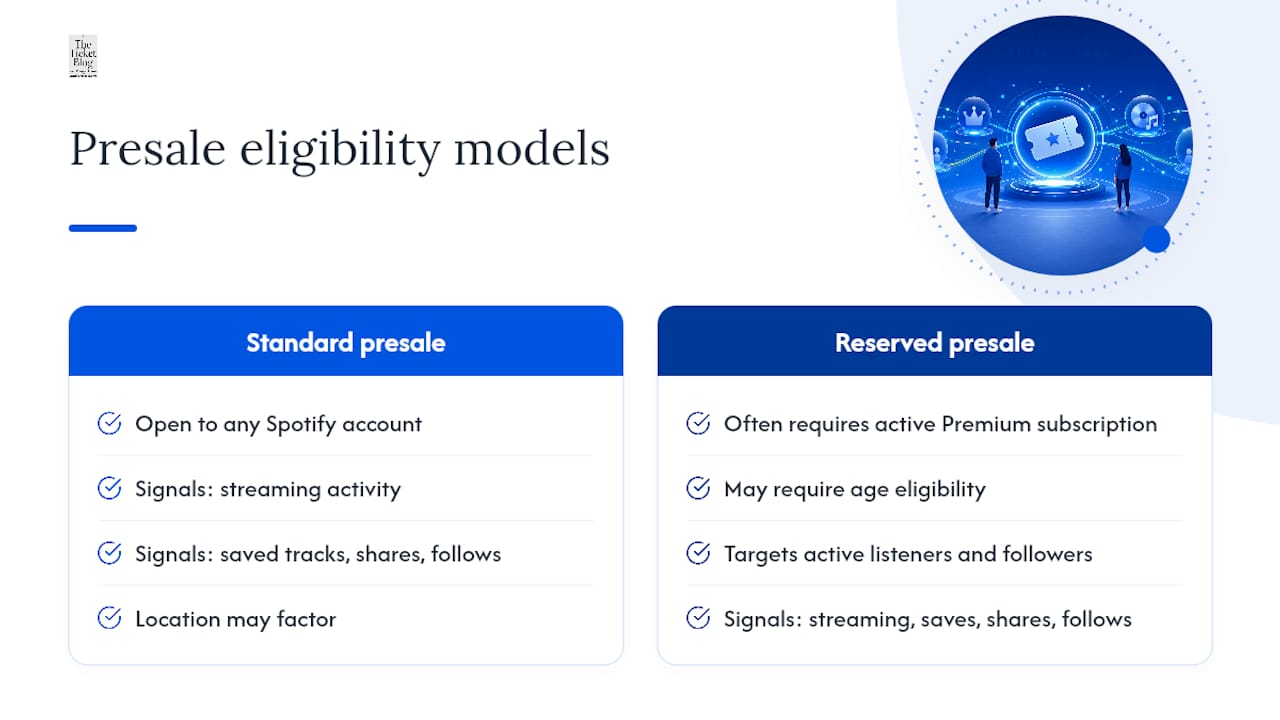
The two models have different baseline requirements. Standard code presales are open to any fan with a Spotify account. Reserved campaigns, however, often require an active Premium subscription and sometimes age eligibility depending on the tour. Ticketmaster’s help documentation confirms Spotify selects active listeners and followers specifically for code distribution.
Pro Tip: Genuine, consistent listening and following an artist well before a tour announcement tends to matter more than a last-minute streaming binge. Spotify’s models likely weight sustained engagement over a sudden spike right before ticket sales.
How to Make Sure You Actually Get the Offer
Missing a presale is often a settings problem, not a bad-luck problem. Run through this before any major tour announcement:
Confirm your email address is verified inside your Spotify account settings.
Turn on “News and Offers” communications so presale emails aren’t blocked at the source.
Enable push notifications for Live Events inside the Spotify app.
Keep location services on so the Live Events Feed can surface local shows.
Follow the artist directly, not just a playlist featuring their music.
Update the Spotify app regularly; outdated versions sometimes miss new event-feed features.
Check spam and promotions folders, since presale emails frequently get filtered.
Note that Reserved availability and code presales can vary by country, so an offer visible to fans in one region may not appear for you.
What to Do When You Get a Presale Code
Once the offer lands, the sequence is nearly identical for both models. Move through it methodically:
Open the email or in-app notification and tap the offer link.
If it’s a Reserved offer, review your eligible tour dates and select one.
Click “Buy Now” or “Redeem,” which will redirect you to Ticketmaster to finish checkout.
Complete payment on the vendor’s site within the active window.
Ticket limits are typically capped around two per eligible fan, whether you’re using a code or a Reserved hold. Reserved allocations cover the tour broadly, not a single date, so you can pick whichever stop fits your schedule during the window.
Pro Tip: Connect your Spotify account to Ticketmaster and save your payment details ahead of time. Spotify recommends this pre-linking step specifically because it removes verification delays right when the clock is running.

How Long Do Presale Windows and Ticket Limits Last?
Reserved windows commonly run around 24 hours, though Live Nation notes exact timing varies by campaign and artist. Standard code presales usually run shorter, often just a few hours before public sale opens.
Most fans can claim up to two tickets per eligible offer.
Reserved holds apply to the entire tour, giving you flexibility across dates and cities.
If you don’t claim a Reserved hold in time, it gets reallocated to the next most engaged eligible fans rather than sitting empty.
Understanding how ticket tiers work helps here too, since a held allocation doesn’t guarantee front-row seating, just a shot at buying before the general public.
Why Didn’t I Get a Presale Code, and What if It’s Not Working?
Most presale frustration comes down to timing, settings, or a checkout hiccup rather than a total shutout. Work through these fixes in order:
Check your Spotify notification settings, spam folder, and confirm you follow the artist.
Remember that not every show gets a Spotify presale, and community discussions show timing can vary widely even for artists you actively follow.
If a code shows as invalid or expired, contact the ticket vendor directly. Spotify does not manage checkout problems.
For queue errors or stuck pages, clear your browser cache, try incognito mode, or switch devices.
Spotify’s own support is clear that purchase issues route to the ticketing company listed in your offer email, not Spotify itself.
Save the exact error message and your purchase link before contacting vendor support; it speeds up resolution significantly.
Tips for Better Presale Odds and Better Seats
A few habits separate fans who consistently land tickets from those who miss out repeatedly.
Link your accounts and save payment information before sale day arrives, not the morning of. Follow and genuinely engage with artists well ahead of any tour announcement rather than scrambling once dates drop. Keep your Spotify app current and notifications active year-round, since eligibility signals often build over months, not days.
If you land a Reserved window, buy early rather than waiting until the final hours. Seat variety and pricing tiers tend to narrow as the window closes, similar to how general ticket discounts shrink as inventory tightens. For traditional code presales, be logged in and ready the moment the code goes live, since those windows close fast.
Pro Tip: Test your Ticketmaster connection to Spotify before the actual sale, not during it. A mock login check catches verification problems while there’s still time to fix them.
How Reserved by Spotify Changes Ticket-Buying Strategy
Reserved fundamentally shifts presales from a speed contest into a planning problem. You’re no longer racing a countdown clock against thousands of other fans refreshing the same page.
Live Nation frames Reserved as a partnership with Spotify and Ticketmaster built specifically to remove the high-pressure, first-come-first-served scramble that has defined on-sales for years, replacing it with held allocations for fans the platform identifies as genuinely dedicated.
That framing matters strategically. Buying early within your window still protects seat choice, even though your ticket isn’t going anywhere. For deeper platform comparisons, The Ticket Blog’s guide to presale access platforms breaks down how Reserved stacks up against other early-access systems.
An editor’s note on presale reality
Presale success usually comes down to boring preparation, not luck. The fans who get in consistently are the ones who checked their settings weeks ahead, not the morning of. Fix your notifications and account links first.
What to Do if You Miss a Spotify Presale
Missing a presale window stings, but it’s rarely the end of the road. Secondary markets, group allocations, and public on-sales often still have options worth exploring, especially if you know where to look and what fees to avoid.
The Ticket Blog tracks fee-saving strategies and deal alerts that public on-sale buyers often miss entirely, from timing tricks to avoiding inflated service fees that stack up during high-demand checkouts. If you need more than the standard two-ticket presale limit, our group discount guide covers alternative paths for larger groups. Start at The Ticket Blog to browse current guides and set up deal alerts for the next tour announcement, so a missed presale doesn’t mean a missed show.
Frequently Asked Questions
Does Spotify presale explained mean the same thing as Verified Fan? Not exactly. Spotify’s current programs, code-based presales and Reserved by Spotify, work similarly to older Verified Fan systems by identifying engaged listeners, but they run through Spotify’s own eligibility signals rather than a separate registration process.
Do I need Spotify Premium to get a presale code? No, standard email and code presales are open to any fan with a free or Premium Spotify account. Reserved by Spotify campaigns, however, often require an active Premium subscription for eligibility.
Why does my presale link redirect me to Ticketmaster? Spotify identifies eligible fans and sends the offer, but the actual ticket sale happens through the vendor tied to that show, most commonly Ticketmaster. Spotify does not process payments or manage inventory itself.
What happens if my Reserved window expires without buying? Your held tickets get released and reallocated to the next most eligible fans in line. The reservation applies to the tour overall, so date flexibility can help you avoid missing out entirely.
Who do I contact if my presale code isn’t working? Contact the ticket vendor listed in your offer email, usually Ticketmaster, since Spotify does not troubleshoot checkout, code validity, or payment problems directly.
Sources
Recommended


Comments